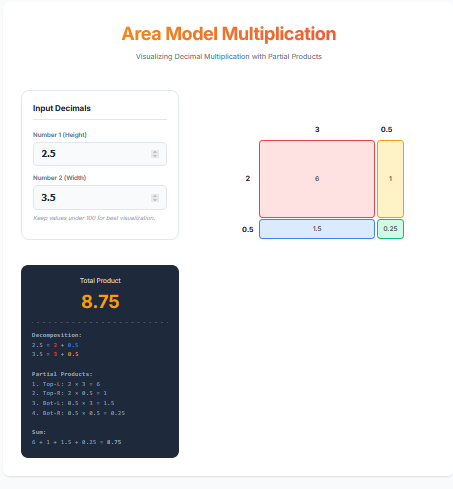
The Area Model Calculator (also known as the Box Method Calculator) is a powerful educational visualization tool. It breaks down multiplication problems—specifically involving decimals—into a grid of easier ‘partial products’. This method is a core part of modern math curriculums (Common Core) because it helps students develop number sense by visually showing *why* multiplication works, rather than just memorizing algorithms.
Calculator Features
Decimal Decomposition: Takes a distinct approach by splitting numbers into Whole Parts and Decimal Parts (e.g., 2.5 becomes 2 + 0.5).
2×2 Grid Visualizer: Generates a proportional grid where each cell represents a partial product (Whole×Whole, Whole×Decimal, Decimal×Decimal).
Auto-Summing: Shows the addition of all four partial products to arrive at the final answer.
Color-Coded Learning: Uses distinct colors for different place values to reinforce the separation of components.
The Math Behind It
The Distributive Property
(a + b) × (c + d) = ac + ad + bc + bd
Where ‘a’ and ‘c’ are whole numbers, and ‘b’ and ‘d’ are the decimal remainders.
Example: 2.5 × 3.5
(2 + 0.5) × (3 + 0.5) = (2×3) + (2×0.5) + (0.5×3) + (0.5×0.5)
Sum: 6 + 1.0 + 1.5 + 0.25 = 8.75
Common Uses
Math Homework Help
Essential for parents and students navigating ‘New Math’. If a worksheet asks to ‘Show your work using the area model’, this tool generates the key.
Teaching Aid
Teachers can use this to generate examples for class, demonstrating how moving the decimal point affects the geometric area.
Mental Math Training
By practicing with the Area Model, users get better at doing mental multiplication by naturally breaking complex numbers into simpler chunks.
Pro Tips
Keep it Simple
This tool is best for numbers like 4.5 x 3.2. If you use extremely long decimals (e.g., 3.14159), the grid becomes too complex. Round to 1 or 2 decimals for the best learning experience.
Relate to Geometry
Think of the problem as calculating the area of a room. 2.5 ft by 3.5 ft. The grid literally draws that room!
Partial Products are Key
Don’t just look at the final answer. The value of this tool is in seeing the intermediate steps (the partial products).
Frequently Asked Questions (FAQ)
1. Why use this instead of a normal calculator?
A normal calculator gives the answer. This calculator explains the *process*. It builds foundational understanding of arithmetic properties.
2. Can I use whole numbers?
Yes! If you input 12 x 15, it will treat the ‘decimals’ as zero, or you can mentally decompose them (10+2) x (10+5) – though this specific tool is optimized for Unit + Decimal part.
3. Is this Common Core compliant?
Yes, the Area Model/Box Method is a standard strategy taught in 4th and 5th grade Common Core Math standards for multi-digit and decimal multiplication.
Final Words
Math connects geometry and arithmetic, and the Area Model Calculator helps you see that connection clearly. By turning abstract multiplication problems into tangible rectangles, it makes learning decimals intuitive, logical, and frustration-free.