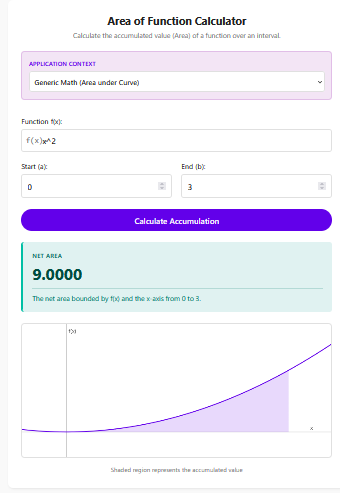
In applied calculus, the Area of a Function represents the accumulated value of a changing quantity over an interval. If a function defines a “rate of change” (like speed, growth, or flow), the area under that function’s graph represents the “total amount” accumulated (like distance, total size, or volume).
This concept is the bridge between derivative rates and integral totals, often summarized by the Accumulation Function:
Total Quantity = ∫[Start to End] Rate(t) dt
Calculator Features
This calculator is unique because it understands the *context* of your problem. Instead of just giving you a number, it interprets what that number means based on the application field you choose.
1. Application Context Switcher
You can toggle the calculator between four specialized modes:
Generic Math: Standard area calculation.
Physics (Velocity): Converts Velocity v(t) into Total Displacement.
Economics (Growth): Converts Growth Rate r(t) into Total Growth.
Engineering (Flow): Converts Flow Rate f(t) into Total Volume.
2. Dynamic Axis Labeling
The interactive graph automatically updates its labels. If you select “Physics,” the x-axis becomes “Time (t)” and the y-axis becomes “Velocity (v),” making it easier to visualize exactly what you are calculating.
3. Contextual Explanations
The result box provides a written explanation tailored to your selected mode. For instance, instead of just saying “Area = 50”, it might say “Total displacement is 50 units.”
Real-World Applications
Physics: From Velocity to Distance
One of the most common applications of integration is kinematics. If you know how fast an object is moving at any given second (velocity function), calculating the area under that curve tells you exactly how far it has traveled.
Hydraulics: From Flow Rate to Volume
For chemical engineers and plumbers, knowing the flow rate (Liters per minute) isn’t enough. Integrating that rate over a specific time duration gives the total volume of fluid that passed through the pipe.
Economics: Marginal vs. Total Cost
In business, “Marginal Cost” is the cost to produce one more item (a rate). Integrating the Marginal Cost function gives the Total Cost of production for a specific batch size.
Tips for Using the Calculator
Match Units Correctly
Integration multiplies the y-axis units by the x-axis units. If your rate is in “miles per hour” (y-axis), ensure your time interval (x-axis) is also in hours. If you use minutes, you must convert them first.
Choose the Right Mode
While the math engine is the same for all modes, selecting the correct context helps verify your answer. If you are solving a physics problem, seeing “Velocity” on the graph confirms you entered the right function.
Frequently Asked Questions (FAQs)
1. Can I use this for non-time variables?
Yes. While the presets often assume “Time” as the independent variable (t), you can generally use it for any dependent/independent variable pair, like “Force over Distance” to find Work.
2. What does negative area mean in these contexts?
In Physics, negative area (velocity) means moving backwards. The result is “Net Displacement” (final position relative to start), not total distance walked. In Economics, a negative growth rate implies a loss or contraction.
3. Is this different from the Definite Integral Calculator?
Mathematically, they perform the same operation. However, the Area of Function Calculator is built for “Applied Calculus,” focusing on interpreting the result in real-world terms rather than just abstract numbers.
4. How do I enter a constant rate?
Simply enter the number. For example, if a car travels at a steady 60 mph, enter “60” into the function box. The area will be a rectangle (Rate × Time).
Final Words
Calculus is the language of change, and the Area of Function Calculator is your translator. By converting instantaneous rates into accumulated totals, it helps you solve practical problems in physics, engineering, and economics with ease. Whether you are tracking fluid volume or calculating displacement, this context-aware tool ensures you not only get the answer but understand what it means.