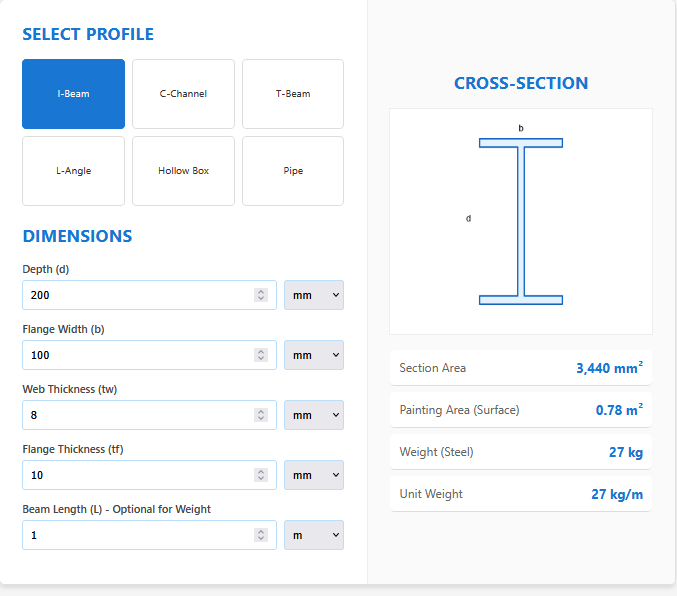
The Beam Cross-Sectional Area Calculator is an all-in-one solution for steel profile analysis. Instead of switching between different tools for every shape, this calculator unifies the math for the six most common structural sections: I-Beam, C-Channel, T-Beam, L-Angle, Hollow Box, and Pipe.
It automates the geometry for calculating the cross-sectional area (A), surface area for painting, and total weight based on standard steel density.
Calculator Features
1. Multi-Profile Support
Select your shape from the visual menu. The inputs dynamically adapt—asking for “Web Thickness” for an I-beam or “Wall Thickness” for a pipe.
2. Fabrication Data
It goes beyond simple area. For every profile, it calculates the “Painting Area” ($m^2$), which corresponds to the total exposed surface area. This is vital for estimating primer, fireproofing, or galvanizing costs.
3. Unit Flexibility
Work in finding measurements? Switch each input individually between millimeters (mm), inches (in), or meters (m). The calculator handles the conversion instantly.
Geometric Formulas
I-Beam & C-Channel
Area is the sum of the flanges and the web:
$Area = (2 \cdot b \cdot t_f) + (d – 2 \cdot t_f) \cdot t_w$
L-Angle (Equal/Unequal Leg)
Area is calculated by splitting the L into two rectangles:
$Area = (d \cdot t) + (b – t) \cdot t$
Hollow Box (RHS/SHS)
Area is the outer rectangle minus the inner void:
$Area = (B \cdot D) – ((B – 2t) \cdot (D – 2t))$
Real-World Applications
Quantity Surveying
Surveyors use this to interpret structural drawings, quickly converting linear meters of beam into tonnes of steel for procurement.
Structural Retrofitting
When reinforcing an existing structure, engineers need to calculate the area of added steel plates or angles to ensure they meet the new load demand.
DIY & Fabrication
Welders building a trailer or workbench can estimate the exact weight of their frame to choose the right axles or casters.
Tips
Painting Area vs. Section Area
Don’t confuse them! “Section Area” ($mm^2$) is the slice of steel. “Painting Area” ($m^2$) is the outside skin. Check your units carefully.
Density Default
The calculator assumes standard carbon steel (approx. $7850 kg/m^3$). If you are using aluminum, divide the final weight by roughly 2.9.
Frequently Asked Questions (FAQs)
1. Does this work for aluminum extrusion?
Yes, the geometry (Area and Surface) is identical. However, the “Weight” result will be wrong because it uses steel density.
2. Why is the Pipe Area formula just circles?
A pipe cross-section is just an annulus (ring). The area is $\pi(R_{out}^2 – R_{in}^2)$. It’s simple but often tedious to calculate manually.
3. Can I calculate tapered flanges?
This tool assumes parallel flanges (standard modern sections). For old-fashioned tapered beams, use the average thickness for $t_f$ to get a close approximation.
Final Words
The Beam Cross-Sectional Area Calculator is the Swiss Army Knife of structural estimation. By centralizing the math for every major profile, it ensures you have the right numbers for every beam, column, and brace in your project.