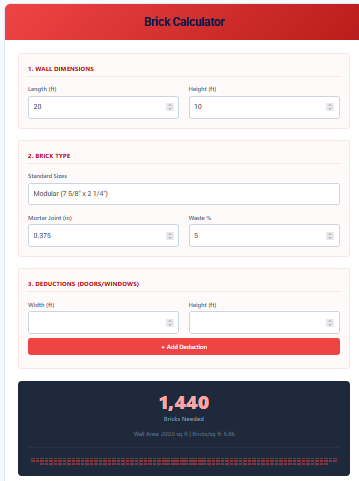
Brick Calculator
A Brick Calculator is a construction estimation tool designed to determine the precise number of bricks required for a wall or building project. It takes into account the dimensions of the wall, the size of the bricks being used, the thickness of the mortar joint, and even deductions for opening like windows and doors. Whether you are building a garden wall, a home extension, or a garage, this tool ensures you order the right amount of material.
Features of Our Brick Calculator
Accurate material estimation prevents project delays and waste. Our calculator includes:
- Flexible Wall Dimensions: Enter the exact length and height of your wall in feet.
- Standard & Custom Brick Sizes: Select from common brick types (Modular, Standard, Engineer, Roman) or input custom dimensions for non-standard masonry units.
- Mortar Joint Adjustment: Account for the mortar gap (default 3/8 inch), which significantly affects the brick count over large areas.
- Openings Management: Add multiple “deductions” for doors and windows. The calculator subtracts these areas from the total to avoid over-ordering.
- Waste Percentage: Includes a configurable waste buffer (default 5%) to account for breakage, cuts, and on-site errors.
- Visual Feedback: A dynamic dot-matrix visualization gives you a sense of the scale of bricks needed.
Common Uses
- DIY Landscaping: Perfect for estimating bricks for retaining walls, planters, or garden borders.
- Home Construction: Calculate specific brick counts for facades, sidings, or interior feature walls.
- Contractor Bidding: Quickly generate material estimates to provide accurate quotes to clients.
How to Use This Calculator
- Wall Dimensions: Enter the length and height of the wall you plan to build.
- Brick Type: Choose your brick from the dropdown. “Modular” and “Standard” are the most common. Select “Custom” if you have specific measurements.
- Mortar & Waste: Adjust the mortar joint size (usually 0.375 inches) and the waste percentage (usually 5-10%) if needed.
- Deductions: If your wall has windows or doors, enter their width and height in the “Deductions” section and click “+ Add Deduction”.
- Result: The calculator displays the total “Bricks Needed” (including waste) along with the Net Wall Area and bricks per square foot.
How It Works
The calculation is based on the “Effective Area” of a single brick.
- First, we calculate the Net Wall Area (Wall Length × Height) – (Area of Doors/Windows).
- Next, we find the area of one brick plus its mortar lines: (Brick Width + Mortar) × (Brick Height + Mortar).
- We divide the Net Wall Area by the Brick Effective Area to get the raw count.
- Finally, we add the Waste % to the raw count to get the recommended total.
Frequently Asked Questions (FAQs)
Q: How much waste should I add?
For simple walls, 5% is standard. for walls with many corners or complex patterns, consider 10%.
Q: Does this calculate mortar bags?
No, this tool provides the count of masonry units (bricks) only.
Q: What is a “Modular” brick?
A Modular brick (7 5/8″ x 2 1/4″) is designed so that three courses (rows) equal exactly 8 inches in height when including mortar, making layout easier.
Q: Can I use this for pavers?
Technically yes, if you enter the paver dimensions and set the mortar joint to 0 (or whatever gap you use), you can estimate count for a patio floor.
Final Words
Don’t let material shortages stop your project halfway. The Brick Calculator gives you the confidence to order the right quantity from the start. Accurate planning is the foundation of any successful masonry job, and this tool helps you lay that foundation perfectly.