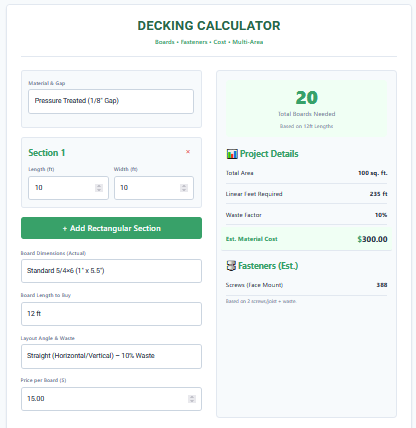
Decking Calculator
A deck is a major investment in your home, often costing thousands of dollars in materials alone. As projects get more complex—involving multi-level platforms, different materials like Cedar or Composite, and hidden fastener systems—simple estimation rules of thumb stop working. The Decking Calculator is an advanced project estimation tool designed for these complex scenarios. Unlike basic area calculators, this tool allows for “Multi-Section” planning, letting you add multiple rectangular zones to create L-shaped or U-shaped decks.
Complete with cost estimation capabilities, this calculator bridges the gap between a design concept and a shopping list. It computes not just the total square footage, but the specific number of boards required based on purchase length (e.g., 12ft, 16ft), the linear footage for pricing, and the total material cost. It also differentiates between “Face Screws” and “Hidden Clips,” adapting to modern installation methods for high-end composite decks.
Features
This Decking Calculator is engineered for detail-oriented planning:
1. Multi-Section Logic: Real decks are rarely just one big rectangle. This tool allows you to “+ Add Rectangular Section” repeatedly. You can model an L-shaped deck by adding two separate rectangles, or a multi-level deck by adding sections for each tier. The calculator sums them all into one cohesive project list.
2. Material Presets: Different woods require different spacing. The tool includes presets for “Pressure Treated” (1/8″ gap), “Cedar/Redwood” (3/16″ gap), and “Composite” (1/4″ gap). Selecting a material automatically adjusts the math to reflect industry-standard installation practices.
3. Advanced Fastener Estimator: It doesn’t just count screws. If you select Composite decking, the tool intelligently switches to estimating “Hidden Clips” (based on 1 clip per joist intersection), whereas for wood, it calculates standard “Face Screws”.
4. Cost Calculation: By inputting the “Price per Board,” the tool provides a live “Est. Material Cost.” This is invaluable for budgeting, allowing you to instantly see the price difference between using 60 composite boards.
5. Board Dimension Flexibility: Choose from standard stock sizes like 5/4×6, 2×6, or 2×4, or define a fully “Custom Size” if you are using exotic hardwoods with non-standard milling.
6. Dynamic Waste Factor: The tool automatically suggests higher waste percentages for diagonal layouts (15%) compared to straight layouts (10%), helping prevent material shortages.
Uses
The versatility of the Decking Calculator makes it suitable for a wide range of users:
- Complex Deck Designs: Perfect for planning wrap-around decks or decks with cut-outs for trees or hot tubs. You can approximate the area by adding positive sections (or conceptually subtracting areas by mentally adjusting section sizes).
- Budget Comparisons: Homeowners often debate between pressure-treated lumber and composite. By running the numbers with two different “Price per Board” inputs, you can see exactly how much the upgrade will cost for the entire project.
- Shopping Lists: The tool outputs “Total Boards Needed” based on a specific length (e.g., “Buy 45 boards of 16-foot length”). This gives you a print-ready list to take to the lumber yard.
- Fastener Budgeting: Hidden fasteners can be expensive. The clip count estimate helps you determine how many boxes of clips to buy, which can be a significant line item in the budget.
- DIY Validation: For DIYers, this tool acts as a “sanity check” against their own manual math, ensuring they haven’t made a gross error in estimating linear footage.
Tips
- Sectioning Strategy: To measure an L-shaped deck, divide it into two non-overlapping rectangles. Calculate Section 1 (e.g., the main deck) and Section 2 (the bump-out) separately in the tool to get the correct total area.
- Price Check First: Before using the cost feature, check your local lumber yard’s website for current pricing on the specific board length you want. 16-foot boards often cost more per foot than 8-foot boards due to the difficulty of milling and transport.
- Hidden Clips: If estimating for hidden clips, remember that you still need screws for the “starter” and “finisher” boards (the first and last board of the deck), which cannot use clips. Always buy a small box of matching face and color-matched screws and plugs.
- Mixing Lengths: The calculator assumes you are buying all boards of one length (e.g., all 12-footers). In reality, you might mix lengths to stagger joints. Use the “Linear Feet” result to mix-and-match your order (e.g., half 12s, half 16s).
- Stairs: Deck stairs are material-heavy. Calculate the area of the stair treads as a separate “Section” to account for the decking material needed for steps.
FAQs
What is the difference between linear feet and square feet?
Square feet measures the total 2D area of the deck surface. Linear feet measures the total length of all the boards laid end-to-end. You buy lumber by the linear foot (or by the board), but you measure your space in square feet.
Does this include the railing?
No, this calculator strictly estimates the surface decking and the fasteners to downstream it. Railings, balusters, and posts are calculated separately based on the perimeter length.
Can I use this for wall cladding?
Yes! If you are doing horizontal wood siding or a rainscreen using deck boards, you can use this calculator. Just enter the wall dimensions as a “Section.”
Why does Composite spacing matter?
Composite decking is made of plastic and wood fibers. The plastic content expands with heat. If you install it tight with no gap, the boards will buckle and warp in the summer sun. The 1/4″ preset helps ensure you have the safe expansion gap.
Is the cost estimate guaranteed?
The cost estimate is a raw material estimate based on your input price. It does not include taxes, delivery fees, or labor costs. Always treat it as a baseline budget.
Final Words
With the rising cost of building materials, accuracy is more important than ever. The Decking Calculator empowers you to plan complex, multi-section projects with confidence, ensuring you have every board and bucket of screws accounted for before the first measurement is even marked.