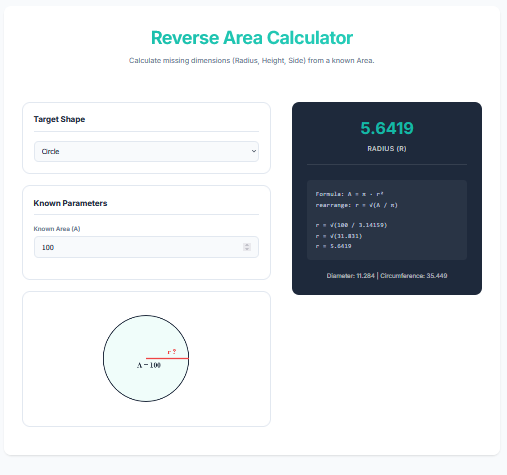
The Reverse Area Formula Calculator is a unique problem-solving tool designed for ‘backwards’ math. Usually, you measure dimensions to find the area. But what if you know the Area you need (e.g., ‘I need a 500 sq ft room’) and one dimension, but need to find the other? Or if you have a circular patch of land with a known area and need the radius? This calculator rearranges geometric formulas to solve for the missing Length, Width, Height, or Radius.
Calculator Features
Multi-Shape Support: Works with Circles, Squares, Rectangles, Triangles, and Trapezoids.
Dynamic Rearrangement: Automatically flips algebraic formulas (e.g., A = lw becomes w = A/l) based on your input.
Visual Feedback: Draws the shape and highlights the ‘Unknown’ dimension in red, helping you visualize the geometry problem.
Step-by-Step Logic: Shows the exact algebra used to isolate the variable, making it great for students checking homework.
The Math Behind It
Circle (Find Radius)
r = √(Area / π)
Derived from Area = πr².
Rectangle (Find Side)
Width = Area / Length
Derived from Area = Length × Width.
Triangle (Find Height)
Height = (2 × Area) / Base
Derived from Area = ½ × Base × Height.
Square (Find Side)
Side = √Area
Derived from Area = Side².
Common Uses
Land Surveying & Zoning
If a plot is sold as ‘1 Acre’ (43,560 sq ft) and you know the frontage width is 120 ft, use this to find how deep the lot goes.
Fabrication & Tanks
Designing a circular tank bottom that must be exactly 50 sq meters? Use the Circle mode to find the exact Radius needed for cutting.
Academic Aid
Perfect for geometry students learning how to manipulate equations and isolate variables.
Pro Tips
Check Your Units
This calculator is unit-neutral. If your Area is in sq ft, your result dimensions will be in ft. If Area is sq meters, result is meters. Never mix units!
Trapezoids are Tricky
For a trapezoid, you usually need to know both bases to find the height, or the height and one base to find the other. The calculator handles these complex rearrangements easily.
Constraint Checking
Sometimes a solution isn’t physically possible (like a negative dimension). The tool validates inputs to ensure real-world geometry.
Frequently Asked Questions (FAQ)
1. Can I calculate the diameter of a circle from area?
Yes! The calculator solves for Radius first (r). Simply multiply the result by 2 to get the Diameter.
2. How precise is the calculation?
It calculates up to 4 decimal places, which is sufficient for high-precision construction or engineering tasks.
3. Does this work for irregular shapes?
No, it relies on standard geometric formulas. For irregular shapes, you would need to break them down into standard shapes first.
Final Words
Stop rearranging equations on scrap paper. The Reverse Area Formula Calculator automates the algebra, giving you instant, accurate dimensions from any Area value. It’s the ‘Un-Calculator’ that every engineer, student, and architect needs in their toolkit.