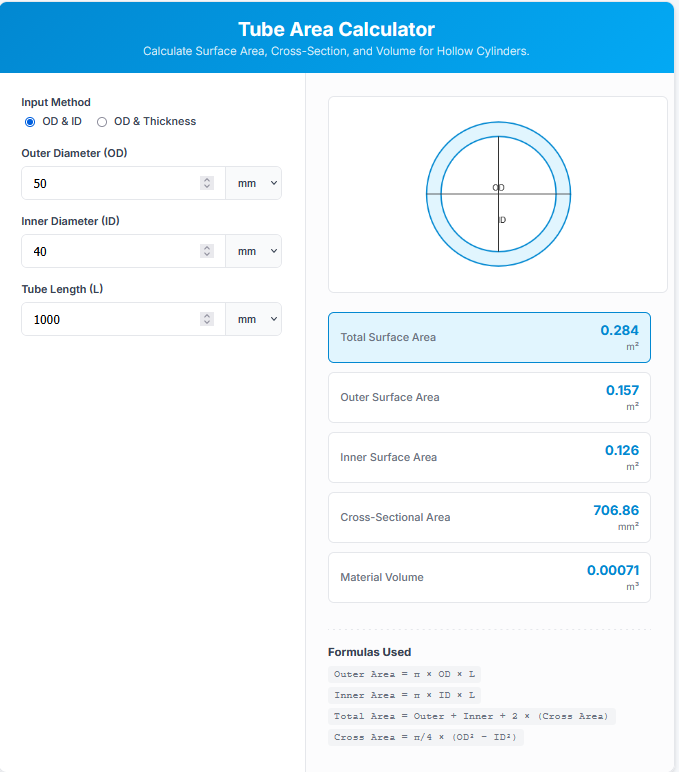
The Tube Area Calculator is a precision tool for engineers and fabricators working with hollow cylinders. Unlike standard cylinder calculators that assume a solid object, this tool accounts for the “void” inside, calculating separate values for Outer Surface, Inner Surface, and Material Volume.
It is essential for estimating painting requirements, coating applications, and calculating the exact volume of metal or plastic in a pipe run.
Calculator Features
1. Flexible Input Modes
Tubing specifications vary by industry. This calculator handles both common conventions:
OD & ID: Uses Outer Diameter and Inner Diameter directly.
OD & Thickness: Uses Outer Diameter and Wall Thickness, automatically inferring the ID.
2. Detailed Surface Breakdown
It doesn’t just give you one number. It breaks down the area into:
Outer Area: For external painting or insulation.
Inner Area: For internal coating or flow friction analysis.
Cross-Section Area: The “face” of the cut tube.
3. Material Volume
Find out exactly how much physical material is in the tube, excluding the empty air inside. This is crucial for weight estimation and cost calculation.
The Math
Surface Areas
The calculator treats the tube as two concentric cylinders:
$Area_{outer} = \pi \times OD \times Length$
$Area_{inner} = \pi \times ID \times Length$
Cross-Section (Annulus)
The area of the ring face is:
$Area_{cross} = \frac{\pi}{4} \times (OD^2 – ID^2)$
Total Surface Area
The sum of all exposed surfaces (Outer + Inner + 2 × Ends):
$Area_{total} = A_{outer} + A_{inner} + 2(A_{cross})$
Real-World Applications
Heat Exchangers
Engineers must know both the inner and outer surface areas to calculate heat transfer efficiency between the fluid inside the tube and the fluid outside.
Painting & Coating
If you need to sandblast the inside of a large pipe, the Inner Surface Area tells you exactly how much abrasive media and time is required.
Structural Weight
By calculating the Material Volume, you can multiply by density (e.g., steel = $7850 kg/m^3$) to find the precise weight of the tube.
Tips
Converting Units
You can mix and match units! Input OD in inches, Length in meters, and the calculator handles the conversion automatically.
Thin-Walled Tubes
For very thin tubes (like copper plumbing), the Outer and Inner areas are almost identical. However, for thick-walled hydraulic cylinders, the difference is massive.
Frequently Asked Questions (FAQs)
1. Does this include the ends?
Yes! The “Total Surface Area” result includes the outer cylinder, inner cylinder, AND the two ring-shaped faces at the ends.
2. What is the difference between Pipe and Tube?
In strict engineering terms, **Tubes** are measured by their exact Outer Diameter (OD). **Pipes** are measured by a “Nominal” size which often doesn’t match the physical dimension. This calculator assumes exact physical OD inputs.
3. Can I calculate volume capacity?
Not directly with the “Material Volume” result. To find how much liquid the tube can hold, look for the “Inner Volume,” which is simply Inner Area × Length / 4 (not explicitly shown here, but governed by ID).
Final Words
Whether you are coating a pipeline or machining a bushing, the Tube Area Calculator eliminates the geometry guesswork. It provides a complete 360-degree analysis of your hollow cylinder in seconds.